Why More Stock Screener Filters Don't Mean More Flexibility
A stock screener with hundreds of filters can still miss your setup. See why stacked filters fall short and how to build a custom scan that fits.
Stock screeners like to advertise how many filters they have, and it is easy to assume a bigger number means more freedom. In practice, adding stock screener filters gives you more ways to ask the same kind of question. It does not give you new kinds of questions.
Flexibility is whether a tool can describe the setup you actually trade. A screener with 300 filters can fail that test, and a scanner with a handful of building blocks can pass it. The difference comes down to how filters work.
What a stock screener filter actually does
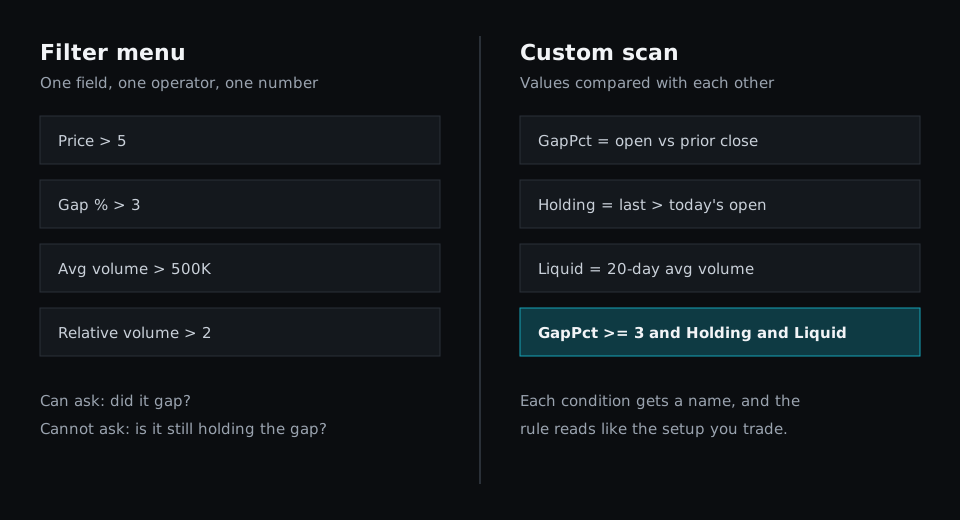
Nearly every filter has the same shape: one field, one operator, one number.
- Price above 5
- Gap above 3%
- Average volume above 500K
- Relative volume above 2
Each filter is a fixed question that someone at the software company decided to offer. If your idea matches one of those questions, you are covered. If it does not, you look for the closest filter and accept the gap between the two.
More filters widen the menu, but you are still ordering from it. A long list helps when you need an obscure field. It does nothing when the thing you need is a relationship between two fields.
Why too many filters return zero results
Most screeners join filters with AND, so a symbol has to pass all of them. Trade Ideas' screener help describes its filters this way. That means every filter you add can only remove rows, never add them.
The cut multiplies quickly. Take a market of 6,000 symbols and suppose each filter passes 30% of what reaches it.
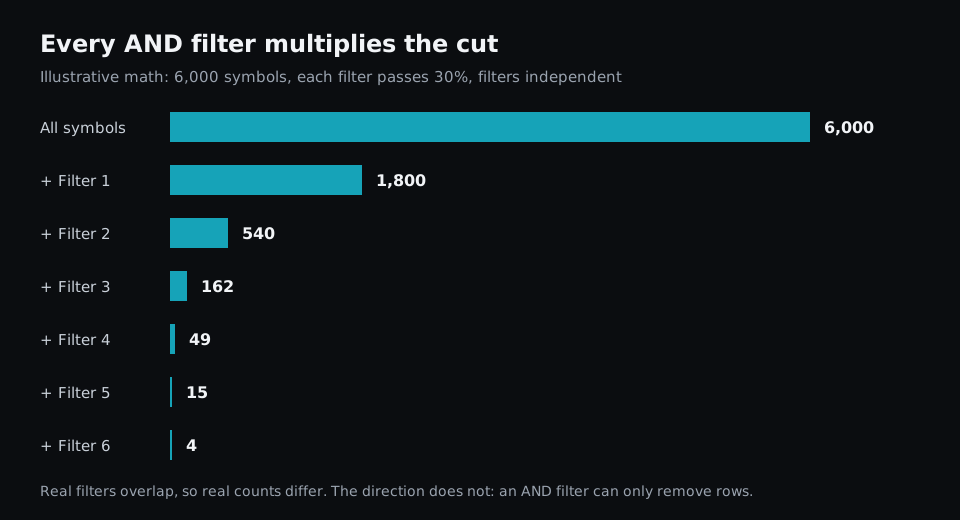
This is illustrative math, and real filters overlap, so real counts will differ. The direction holds, though. Six reasonable conditions can leave you with almost nothing, which is why scans with too many filters so often come back empty.
There is a quieter cost as well. Every filter is a hard line. A stock with relative volume of 1.98 fails a filter set at 2, even if it passes everything else and is the best chart of the day. Our guide to scanning volatile markets lists this as the first mistake traders make, because a strict scan hides the near misses.
Some platforms soften this by letting you group conditions. Deepvue, for example, lets a group require ALL or ANY of its conditions. That helps, but each condition is still a fixed question.
Four things filters struggle to express
Most trading ideas are about relationships, order and context. Those are the areas where a menu runs out.
Relationships between values. "Up 3% today" is a single number. "Up 3% today and still above the open" compares two live values, and it separates a gap that is holding from one that is fading.
Order of events. "Three closes under VWAP, then a close back above it" is a sequence. A filter sees the current state, so it cannot tell you what happened first.
A stock against its own history. Many screeners offer relative volume as a filter. The moment you want the last one-minute bar compared with the 20 bars before it, you need a definition the menu may not have. Relative volume is also calculated differently across platforms, so the same threshold can mean different things.
Your own definitions. Every trader has a private meaning for words like "tight", "extended" or "liquid". A filter can only offer the vendor's meaning.
Why more filters also make scans harder to use
There is a practical cost to a large menu too. Finding the right filter takes longer, and similar names hide different definitions. Scans also become hard to read a month later. A list of 14 filters tells you what was switched on, but it does not tell you the idea behind it.
Long filter lists also tend to fit a recent market too closely. When you keep adding conditions until yesterday's winners appear, you have described yesterday. A scan built that way usually needs rebuilding as soon as conditions change.
What real flexibility looks like in a stock scanner
A flexible stock scanner gives you a small set of building blocks that combine freely:
- Fields such as price, volume, bid and ask
- Windows into past bars, like the last 20 one-minute bars
- Comparisons between any two values, not only against a fixed number
- Names so a condition you define once can be reused
This is why platforms add a layer above the filter list. StockCharts describes its screener as blunter than a scan and suggests converting one to a scan when you need the in-between conditions. Trade Ideas has a formula editor for building custom filters, and thinkorswim supports custom study filters written as scripts. They all arrive at the same place: past a certain point, a longer list stops helping and traders need a way to write their own logic.
How to build a custom stock scan
Here is the gap example from above written out in full. This is a Fastur script, but the structure carries over to any scanner that supports formulas.
# Gapped up at least 3% and still holding above the open
GapPct = (d1.open - d1.close[1]) / d1.close[1] * 100
Holding = trade.last > d1.open
Liquid = d1.volume[1:20].mean > 500000

rule gap_hold:
    on = cadence.m1
    when = GapPct >= 3 and Holding and Liquid

scan "Gap Hold":
    rule = gap_hold
    universe = "ALL"
    columns = [trade.last, d1.open, GapPct]
    sort = GapPct
    extract = descending
There are only three conditions, yet the second one is something a typical filter menu cannot ask. Because each condition has a name, the rule reads like the setup: gapped, holding, liquid. Coming back to it next month takes seconds.
The same pattern handles a stock measured against its own recent activity:
# The last bar traded twice its 20-bar average, on a tight spread
Surge = m1.volume[1] >= m1.volume[2:21].mean * 2
Tight = quote.ask - quote.bid < trade.last * 0.002
AboveVwap = m1.close[1] > d1.vwap

rule volume_surge:
    on = cadence.m1
    when = Surge and Tight and AboveVwap

scan "Volume Surge":
    rule = volume_surge
    universe = "ALL"
    columns = [trade.last, d1.vwap, m1.volume[1]]
    sort = m1.volume[1]
    extract = descending
Tight here is a personal definition: a spread under 0.2% of the price. If yours is different, you change one number instead of hunting for another filter. The scripting docs cover the fields, windows and studies you can use.
You do not have to write code to work this way. In Fastur, a condition can be saved as a named LogicBlock, and a scan can be built by picking those blocks in a form.
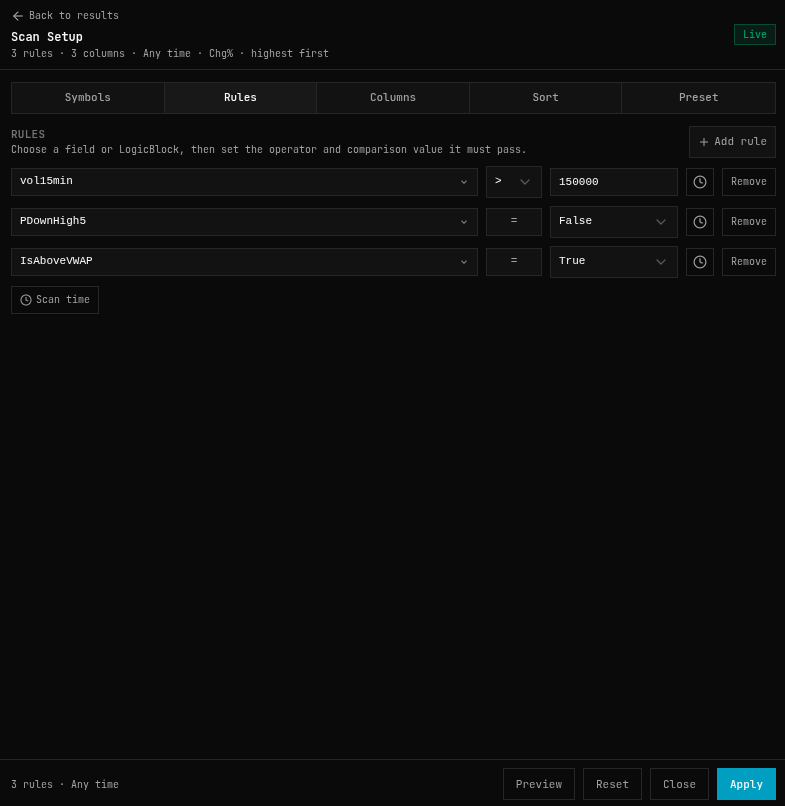
You can also describe a setup in plain English and have the AI write the scan, then read the result to check it says what you meant.
How many filters should a stock scanner have?
Fewer than you think. Published advice tends to land between three and five core conditions, then adding one at a time while watching how many symbols remain. That is opinion rather than research, but it matches how AND logic behaves.
A useful way to decide is to ask three questions about each condition:
- Would I skip a stock that failed only this condition?
- Is it part of the setup, or just something that made a past result look better?
- Can I explain in one sentence why it is here?
If a condition fails those questions, make it a column instead. You can then see the value and judge it yourself, without letting it hide the stock.
When a long filter list is enough
Filter menus are not a mistake. For slow questions, such as finding profitable companies under a certain valuation, simple field comparisons do the job. Our comparison of free and paid stock screeners covers where the basic tools are plenty.
The limit appears when your idea depends on what price and volume are doing right now, in what order, and relative to what. Writing custom logic also takes more effort than ticking boxes, and a formula can be wrong in ways a checkbox cannot. So it is worth doing for the setups you trade repeatedly, not for every passing idea.
The takeaway
Judge a stock screener by what you can describe with it, not by how many filters it lists. Take the setup you actually trade, write it down in one sentence, and try to build it. If you have to swap parts of that sentence for the nearest available filter, you have found the tool's real limit. For the wider checklist, see the essential features of a modern stock scanner.
