Why "Real-Time" Stock Scanners Are Often Misleading
Many real-time stock scanners run your scan on a snapshot and only stream prices to the results. See what that hides and how to test a scanner.
Almost every stock scanner now calls itself real-time. Open one and the prices flash, the percentages tick and the table looks alive. But live prices on the screen do not tell you whether the scan itself is live.
A common design works like this: the scanner takes a snapshot of the market, runs your scan on that snapshot, and then connects the matching symbols to a real-time feed. The rows update every second, so it feels real-time. The decision about which stocks are on the list was made on a timer.
This post explains how that design works, what it hides, and how to test any real-time stock scanner yourself in a few minutes.
A scanner does two jobs
Every stock scanner answers two separate questions:
- Which stocks match my conditions right now?
- What are those stocks doing?
The second question is easy to answer in real time. You subscribe a few dozen symbols to a price feed and show what comes in. The first question is the hard one. To answer it live, the scanner has to check your conditions against every stock in the market, every time new data arrives.
When a product calls itself a real-time stock scanner, it can mean either one. Usually it is only clear which once you look at how the results behave.
How snapshot scanners with live results work
A snapshot scanner handles the hard question on a schedule and the easy question live:
- Every few seconds, every minute, or when you press scan, it copies the current state of the market.
- It runs your scan on that copy.
- It shows the matches as a list.
- It streams live prices to the rows on that list until the next run.
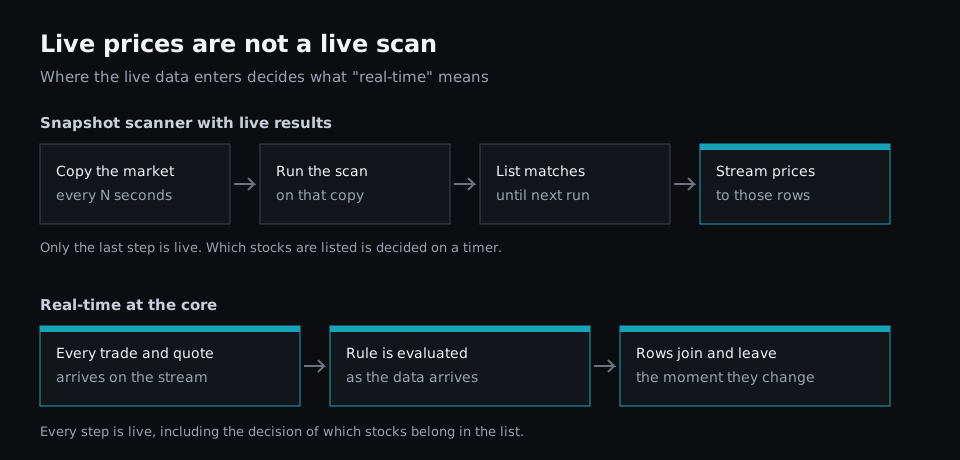
There is a reason vendors build it this way. Checking thousands of symbols against your conditions on every trade takes far more computing than checking them once a minute. A snapshot is cheaper to run and easier to build. The design is not the problem. The problem is calling the result real-time without saying that the scan runs on a timer.
Interval limits are sometimes written down, if you look. The thinkorswim manual, for example, says Stock Hacker scan results are "dynamically updated", and on the same page notes that "the results of pattern filter scans are updated hourly." More often the refresh interval is not mentioned at all.
What a snapshot scan hides
Moves that happen between two snapshots
If a stock qualifies 20 seconds after a scan runs and falls back before the next one, it is never listed. Live prices cannot fix this, because the stock was never on the list to receive them.
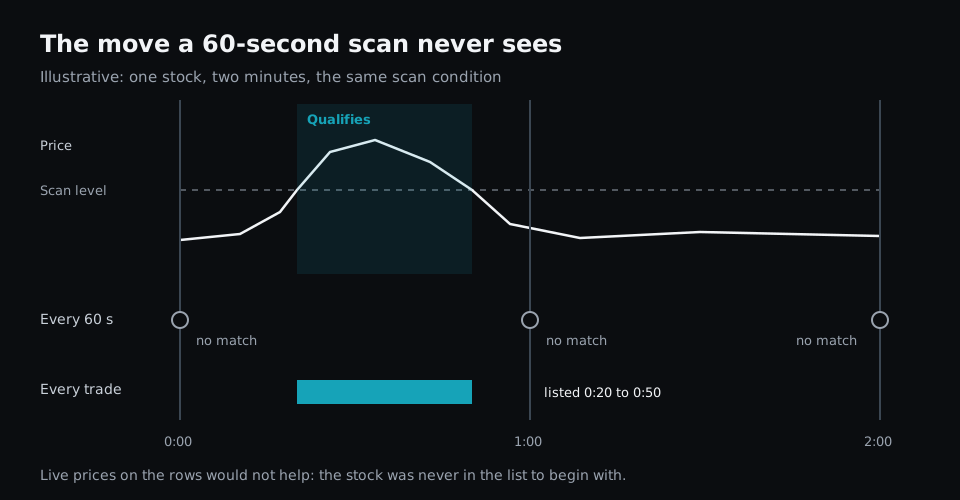
Fast moves are exactly the ones that tend to be short. A halt and resume, a news spike, or a break of the high of day can start and finish inside one interval. Those are often the setups a trader opened a scanner to catch.
Late entries
When a stock does stay in play long enough to be caught, it appears at the next run, not when it qualified. With a 60-second interval, that is anywhere from zero to 60 seconds late, and you cannot tell which. On a momentum stock, the first part of the move is often the best part.
Rows that no longer match
This is the most misleading part of the hybrid design. A stock that stopped meeting your conditions stays on the list until the next run, and its price keeps updating live. The ticking price makes the row look current, even though the reason it was listed is gone.
Say your scan looks for stocks above VWAP. A stock drops below VWAP, but it is still on your list for the rest of the minute, with a live price that now shows it below. You have to notice that yourself.
A ranking from the past
Sorting has the same problem. If the list is ranked by gap or by volume at the last run, the order you see can be from the previous snapshot while the prices next to it are live. The top row is not necessarily the strongest stock right now.
How to tell if a stock scanner is really real-time
You can test any scanner during market hours without special tools.
- Time the entries. Watch a stock on a 1-minute chart and note when it crosses one of your scan conditions. Then note when it appears in the scanner. Do this a few times. If the delays vary from a moment up to a fixed limit, such as 60 seconds, the scan runs on a timer.
- Watch a row leave. Pick a listed stock that is close to failing a condition. When the chart shows it failing, see whether the row drops out right away or lingers with a live price.
- Check whether rows move together. If rows enter and leave in batches at regular times, the scan is running on a schedule. A scan evaluated on live data changes one row at a time, whenever each stock changes.
- Look for the words. Search the settings and documentation for "refresh", "interval", "updated every" or "scan frequency". A setting like that means the scan is not evaluated on live data.
- Ask support one question. "Is my scan evaluated on every trade, or on a schedule?" A real-time scanner can answer that in one sentence.
Real-time from the core: how Fastur runs scans
Fastur was built the other way around. The engine evaluates scans on the live market data stream itself, not on a copy of it. When a trade arrives, the rules that depend on it are checked, and rows join or leave the list as it happens. There is no snapshot, and no separate step that connects the results to a live feed afterwards, because the scan already runs on live data.
You can see this in every scan. Each rule has an on line that says when it is evaluated:
# Up more than 2% today, checked on every trade
prev_close = d1.close[1]
logicblock MOVE_PCT = (trade.last - prev_close) / prev_close * 100

rule movers:
    on = cadence.trade
    when = MOVE_PCT > 2 and trade.last > 5

scan "Movers":
    rule = movers
    universe = "ALL"
    columns = [trade.last, MOVE_PCT, trade.volume]
    sort = MOVE_PCT
    extract = descending
With cadence.trade, the rule is checked every time a stock trades. A stock that qualifies at 20 seconds is listed at 20 seconds, and it leaves the list when it stops qualifying, not at the next run. The ranking moves with it.
Sometimes a slower check is what you want. A setup built on completed 5-minute bars should not change halfway through a bar, so you can set on = cadence.m5 and the rule is checked as each bar closes. The scripting docs list every option: each trade, each quote, every 30 seconds, every minute, every 5 minutes or daily. The difference is that slower is a choice you make in the script, not a limit hidden inside the product.
When a snapshot scanner is enough
Snapshot scanners are fine for plenty of work. If you trade swings, review the market after the close, or look for stocks to research over the weekend, a scan that runs every few minutes, or once a day, gives you the same answer. Our free vs paid screener comparison covers where the simpler tools are plenty.
It matters when you trade the open, momentum, news or volume spikes, where the window between qualifying and moving on can be shorter than a scan interval. For more on what slips through between scans, see why snapshot scanners miss the best trades. If you are still deciding whether you need live data at all, read our comparison of real-time and delayed data.
The takeaway
Live prices on the rows do not make a stock scanner real-time. What matters is when your scan is evaluated. Ask whether a stock is listed the moment it qualifies, and removed the moment it stops. If the honest answer is "at the next refresh", the scanner is a snapshot with live prices on top. For the rest of what to look for, see the essential features of a modern stock scanner.
