Why Time-Based Conditions Matter in a Stock Scanner
A price means different things at 9:35 and 2:30. See how time-based conditions like opening ranges, time windows and event order sharpen a stock scan.
Most stock scanner conditions describe a number: price above 5, volume above a million, gap above 3%. Traders rarely describe a setup that way. They say things like "it broke the opening range, came back to VWAP and is holding higher lows." Almost every part of that sentence is about time: when something happened, how long ago, and in what order.
A time-based condition is one that depends on the clock. This post explains the three kinds, why the same number means different things at different times, and how to write time-based conditions into a stock scan.
What is a time-based condition?
A time-based scan condition does not only ask what a value is. It asks when. There are three kinds, and most real setups use more than one.
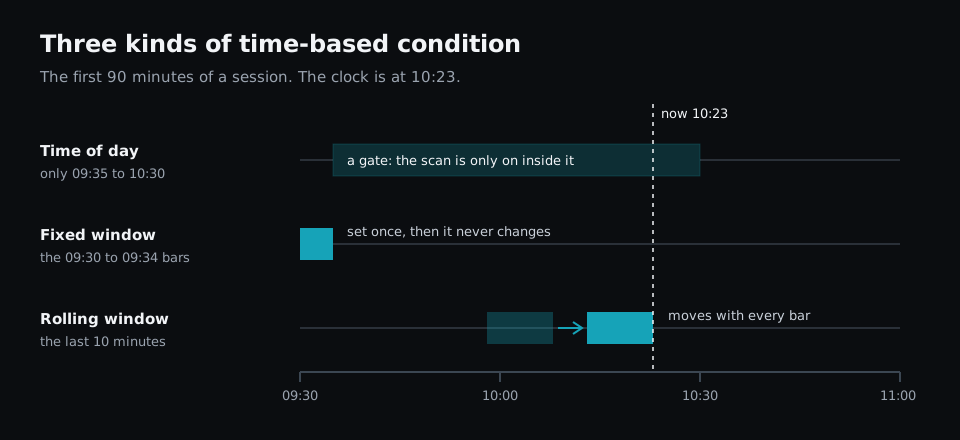
- Time of day. The condition only counts inside part of the session. "First hour only" and "not during lunch" are time of day conditions.
- A fixed window. The condition reads a set stretch of the day. The opening range is the high and low of the first five minutes. The premarket high is the highest price between 04:00 and 09:29. Once that stretch is over, the value never changes.
- A rolling window. The condition reads the most recent bars, such as the last 10 minutes or the last 20 days. The window moves forward as time passes, so the value keeps changing.
There is a fourth idea built on top of these: order. "Broke out, then pulled back" is two conditions where one has to come before the other.
The same number means different things at different times
Here is one stock crossing the same price level three times in one session.
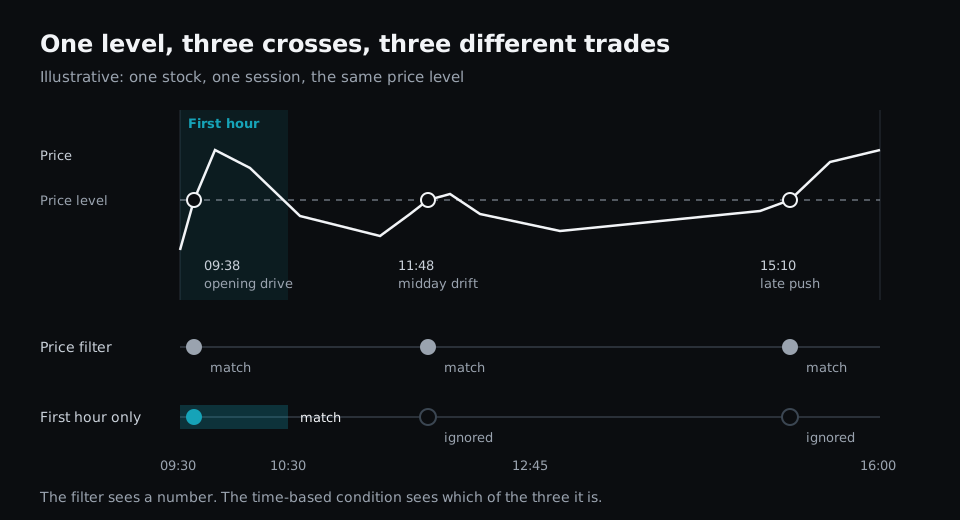
A filter that says "price above the level" matches all three crosses. To a trader they are three different situations:
- At 09:38 it is an opening drive, usually on the heaviest volume of the day.
- At 11:48 it is a midday drift, when volume is typically at its thinnest.
- At 15:10 it is a late push into the close.
None of these is better than the others. They are simply different trades, with different volume behind them and different amounts of session left. A scan that cannot tell them apart hands you all three and leaves the sorting to you.
Volume has the same problem. A stock that has traded 2 million shares by 09:45 is having an unusual morning. A stock that has traded 2 million shares by 15:30 may be having a normal day. "Volume above 2 million" matches both. The number is the same, but the time changes what it tells you.
Setups are sequences, not snapshots
Take the setup from the top of this post: an opening range breakout that pulls back to VWAP and makes higher lows. Written out as steps, each one has its own clock.
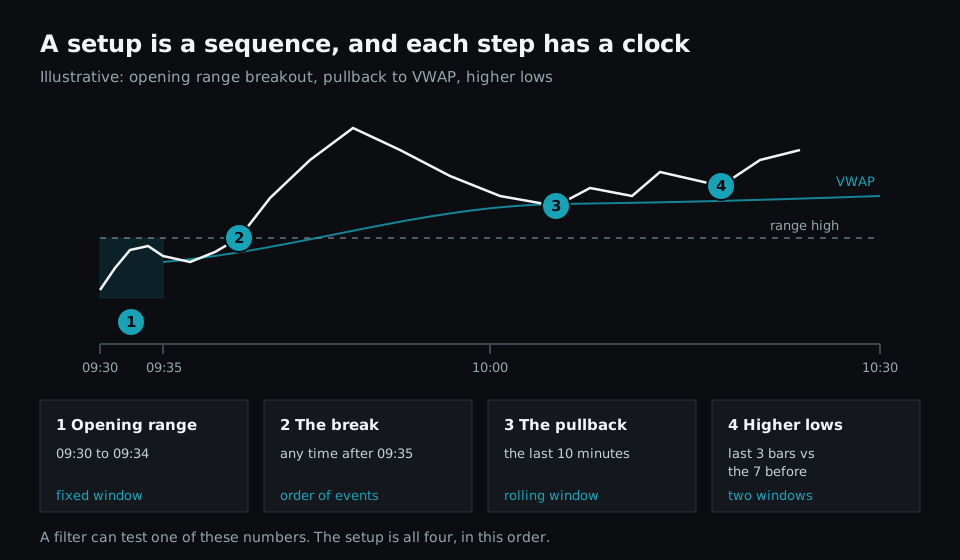
- The opening range is a fixed window: the 09:30 to 09:34 bars.
- The break has to come after the range is set. That is order.
- The pullback to VWAP has to be recent, for example in the last 10 minutes. That is a rolling window.
- Higher lows compares two rolling windows: the lows of the last three bars against the lows of the seven before them.
A filter can test one of these numbers at a time. It can tell you a stock is above its opening range high. It cannot tell you that the stock broke out, came back and is now turning up again, because that is a statement about what happened and in what order. Our post on why more filters do not mean more flexibility covers the general version of this limit.
Four things time-based conditions give you
Fewer, better matches
Limiting a scan to the part of the day you actually trade removes matches you would have skipped anyway. If you only trade the first hour, a breakout at 14:00 is noise in your list.
Levels that mean something
Opening range high, premarket high, the high of the first 30 minutes and yesterday's close are all levels defined by time. They matter because many traders watch the same ones. A scanner that cannot define a level by a time window cannot scan for them directly.
Freshness
"Pulled back to VWAP" is only useful if it happened recently. A rolling window lets you say "in the last 10 minutes" instead of "at some point today", which is the difference between a setup that is forming now and one that finished an hour ago.
Setups that read the way you think
When a scan can express time and order, the rule can follow the sentence you would use to describe the trade. That makes it easier to check, easier to change and easier to trust.
Time-based conditions need a scan that keeps running
A rolling window moves. "The low of the last 10 minutes" is a different value at 10:23 than it was at 10:22. A scan that checks once a minute, or only when you press a button, reads that value at whatever moment it happens to run.
That matters most for the last step of a sequence. In the example above, the setup becomes true when the second higher low holds. If the scan is evaluated on every trade, the stock is listed, and an alert can fire, on the trade that completes the setup. If the scan runs on a timer, you find out at the next run, and a setup that completed and failed between two runs is never listed at all. We covered that gap in why "real-time" stock scanners are often misleading.
How to write time-based conditions in Fastur
Fastur scans are written as a short script, or described in plain English and turned into one by the assistant. The language has a direct way to write each kind of time-based condition:
| Kind | Example | Meaning |
|---|---|---|
| Time of day | clock.time < 37800 | Before 10:30 Eastern |
| Fixed window | m1.high[t"09:30":t"09:34"].max | High of the first five 1-minute bars |
| Rolling window | m1.low[1:10].min | Lowest low of the last 10 completed minutes |
| Cadence | on = cadence.trade | Check the rule on every trade |
clock.time is the time in Eastern seconds since midnight, so 09:35 is 34500 and 10:30 is 37800. A time window like t"09:30":t"09:34" covers today's bars between those times. An ordinal window like [1:10] counts back from the last completed bar.
Here is the setup from this post as one scan:
# Opening range breakout that pulled back to VWAP, first hour only
logicblock OrHigh = m1.high[t"09:30":t"09:34"].max
logicblock FirstHour = clock.time > 34500 and clock.time < 37800
logicblock BrokeRange = d1.high > OrHigh
logicblock VwapPullback = m1.low[1:10].min < d1.vwap * 1.002
logicblock HigherLows = m1.low[1:3].min > m1.low[4:10].min
logicblock Reclaimed = trade.last > d1.vwap and HigherLows

rule orb_pullback:
    on = cadence.trade
    when = FirstHour and BrokeRange and VwapPullback and Reclaimed

scan "ORB Pullback":
    rule = orb_pullback
    universe = "ALL"
    columns = [trade.last, OrHigh, d1.vwap]
    sort = trade.volume
    extract = descending
Each line maps to one step of the sequence:
OrHighis the fixed window: the high of the 09:30 to 09:34 bars.FirstHouris the time of day gate. It starts at 09:35 so the opening range is complete before the scan uses it.BrokeRangechecks that today's high is above the opening range high, so the break has already happened.VwapPullbackis the rolling window: the lowest low of the last 10 minutes came within 0.2% of VWAP or below it.HigherLowscompares two rolling windows, andReclaimedadds that the price is back above VWAP.
The rule runs on cadence.trade, so it is checked every time a stock trades. The scripting docs list every field, window and cadence.
Time-based scans traders commonly build
These are setups that depend on time and are awkward or impossible to build from a filter menu:
- Opening range breakout. Price above the high of the first 5, 15 or 30 minutes.
- Premarket high break. Price above the highest premarket print, after the open.
- First pullback. A stock that made a new high of day and has pulled back for the first time.
- Midday range break. Price leaving the range it held between 11:30 and 13:30.
- Late-day strength. New highs in the last hour, limited to stocks that were already up on the day.
- Fresh new high. A new 20-day high made in the last few minutes, not hours ago.
If you build a morning routine around scans like these, our guide to building a pre-market trading routine covers what to prepare before the open.
When you do not need time-based conditions
Not every scan needs a clock. If you trade swings or build watchlists after the close, daily values are enough: a 50-day average, a 52-week high, a week of rising closes. Those are rolling windows too, but on daily bars the time of day does not come into it, and almost any screener handles them.
Time-based conditions start to matter when you trade intraday, and they matter most at the open, when the same price and the same volume can mean very different things from one half hour to the next.
The takeaway
A scan built only from numbers answers "what is true right now?" A scan with time-based conditions answers "what has happened, when, and in what order?" That second question is the one traders actually ask. When you compare tools, check whether a scanner can limit a condition to a time of day, read a fixed window like the opening range, read a rolling window like the last 10 minutes, and combine them in order. For the rest of what to look for, see the essential features of a modern stock scanner.
