Why "X Happened Before Y" Matters in a Stock Scanner
Two stocks can show the same numbers and be opposite trades. See why the order of events matters in a stock scan and how a scanner can check it.
Ask a trader to describe a setup and you will hear the word "then" a lot. It broke out, then pulled back. Volume came in, then price moved. It lost VWAP, then took it back. The word is doing real work: it says one thing happened before another.
Most stock scanners drop that word. They check what is true right now and ignore how the stock got there. This post explains why the order of events changes the trade, why a snapshot of current values cannot see it, and how a scan can check that X happened before Y.
What "X happened before Y" means in a stock scan
An order-of-events condition, also called a sequence condition, has three parts:
- X happened. For example, the stock made a new high of day.
- Y happened. For example, the stock touched VWAP.
- X came first. The high was made before the touch, not after.
The first two parts are ordinary conditions, and nearly any scanner can test them. The third part is the one that needs something extra, because it is not a fact about the stock right now. It is a fact about its history.
The same facts in a different order are a different trade
Here are two stocks on the same morning. Both made a new high of day. Both touched VWAP. Both trade at the same price right now.
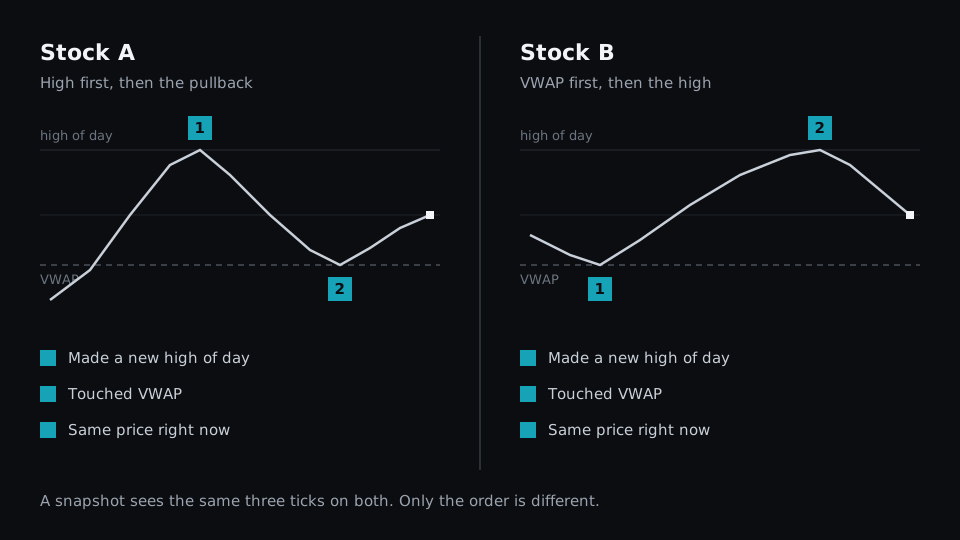
Stock A made its high first, pulled back to VWAP and is turning up again. That is a pullback after a breakout, and the pullback has already happened.
Stock B touched VWAP early, ran to its high and has just started to come off it. It has not pulled back yet. If you are waiting for a pullback entry, B is early. If you chase extended moves, B is your stock and A is not.
Neither one is the better trade. They are different trades, and a trader who wants one of them does not want the other on the list.
Why a snapshot scan cannot see order
A scan built from current values asks questions like these:
- Is today's high above yesterday's high?
- Is today's low at or below VWAP?
- Is the last price above some level?
Stock A and Stock B give the same answer to all three. Today's high and today's low are single numbers. They record that something happened, and they throw away when.
This is why a list from a typical scan mixes setups that look nothing alike on a chart. The scan was correct about every condition. It simply had no way to ask which came first. We covered the related limit of filter menus in why more filters do not mean more flexibility.
Common "X before Y" setups
Order shows up in most intraday setups once you look for it. In each row below, the two columns use the same events and describe different situations.
| X, then Y | Y, then X |
|---|---|
| Broke the opening range, then pulled back to VWAP: a continuation setup | Sat at VWAP, then broke the opening range: a fresh breakout with no test yet |
| Volume surged, then price broke out: buyers arrived before the move | Price broke out, then volume surged: the crowd arrived after the move |
| Lost VWAP, then reclaimed it: a failed breakdown | Reclaimed VWAP, then lost it: a failed bounce |
| Gapped up, then filled the gap, then made a new high: strength after a test | Made a new high, then filled the gap: the gap is failing |
| Made a higher low, then a higher high: a trend forming | Made a higher high, then a lower low: a range or a reversal |
If your setup has a "then" in it, the reverse order is almost always a different setup. A scan that cannot tell them apart returns both.
How a scanner can check the order of events
There are three common approaches, and they differ in how much work they leave to you.
By eye. The scan returns every stock where X and Y are both true, and you open each chart to see which came first. This works, and it is what most traders do today. It is also slow at exactly the time of day when speed matters.
Chained alerts. You set an alert for X, wait for it to fire, then set up a second scan for Y on that stock. This gets the order right, but only for the few stocks you can track by hand.
Windows in the scan itself. The scan looks at two stretches of recent bars: an earlier one and a recent one. If X is found in the earlier stretch and Y in the recent one, X came first.
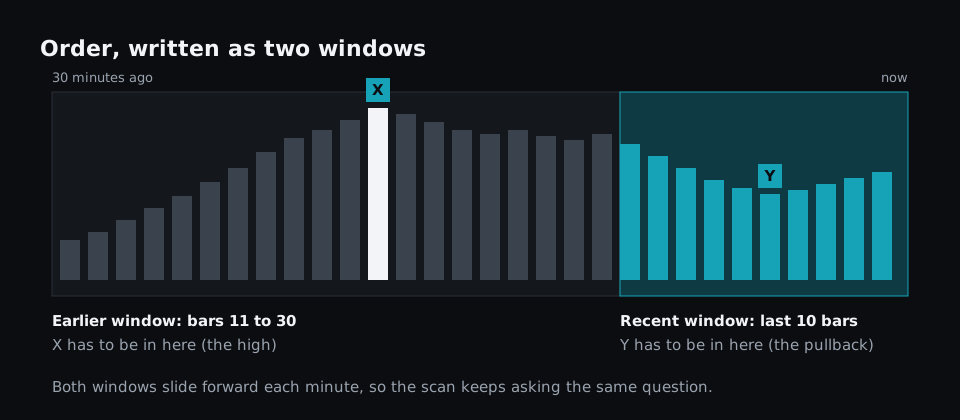
The third approach is the one that scales, because the scanner checks every stock the same way. Both windows slide forward as time passes, so the question stays the same from one minute to the next. Our post on time-based conditions covers rolling and fixed windows in more detail.
Order needs a time limit
"X before Y" is not enough on its own. A stock that broke out at 09:41 and touched VWAP at 14:10 did both things in the right order, and nobody would call that a pullback to the breakout.
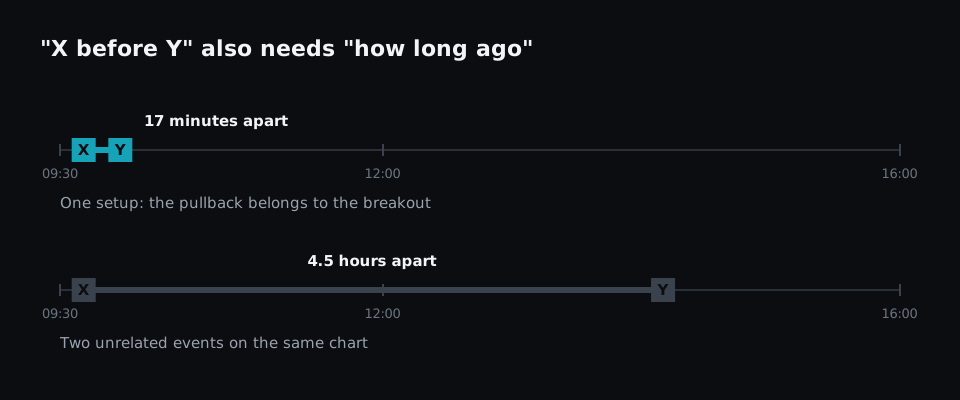
A useful sequence condition answers three questions:
- Did X happen before Y?
- How far apart were they? Close enough that Y is a response to X.
- How recent is Y? Recent enough that the setup is still live.
The window approach handles all three at once. The size of the earlier window limits how far back X can be. The size of the recent window limits how old Y can be.
How to write "X before Y" in Fastur
In Fastur, a condition can read a window of past bars, such as the last 10 one-minute bars or the 20 before those. Order is written by pointing two conditions at two different windows:
logicblock HighCameFirst = m1.high[11:30].max > m1.high[1:10].max
logicblock PulledBackSince = m1.low[1:10].min < d1.vwap * 1.002
HighCameFirst says the highest price of the last 30 minutes was set in the earlier stretch, not in the last 10 minutes. PulledBackSince says that within the last 10 minutes the stock came down to within 0.2% of VWAP. Used together, they describe Stock A from the chart above and leave out Stock B.
The window sizes are yours to choose. A scalper might use 5 and 15 bars. Someone trading slower pullbacks might use 5-minute bars. The scripting docs list the timeframes and windows available.
You can also describe the sequence in plain English, such as "made a new high, then pulled back to VWAP in the last 10 minutes", and have the assistant write the conditions. Read the result to check that the order is the one you meant.
Why order needs a scan that keeps running
A sequence becomes true at a specific moment: the moment Y completes it. If the scan is checked on every trade, the stock is listed on the trade that finishes the sequence. If the scan runs once a minute or when you press a button, you see it at the next run, and a sequence that completed and failed in between is never listed. We covered that gap in why "real-time" stock scanners are often misleading.
How to test whether a scanner handles order
You can check any scanner in a few minutes:
- Pick a setup with a clear "then", such as a breakout followed by a pullback.
- Find two stocks from a recent session: one that did it in that order and one that did it in reverse.
- Build the scan and see whether it can list the first without the second.
If the only way to separate them is to open both charts, the scanner is testing facts, not order.
When order does not matter
Plenty of scans do not need it. A list of stocks above their 200-day average, a 52-week high list or a search for high relative volume are all about the current state, and a snapshot answers them well. End-of-day screening rarely needs order within the session either.
Order matters when your entry depends on what the stock just did. That covers most pullback, reclaim and failed-move setups, which are the ones intraday traders describe with the word "then".
The takeaway
Two stocks can pass every condition in a scan and still be opposite trades, because the conditions say what happened and not which came first. When you write down a setup, look for the word "then". Each one is an order-of-events condition, and it needs a time limit to mean anything. Then check whether your scanner can express it or whether you are sorting the list by eye. For the wider checklist, see the essential features of a modern stock scanner.
