Stock Screener vs Stock Scanner: What Is the Difference?
A stock screener filters the market when you run it. A stock scanner watches the market and tells you when a stock starts to match. See when each one fits.
A stock screener and a stock scanner both take a list of conditions and return the stocks that meet them. The difference is when they check. A screener checks once, at the moment you run it. A scanner keeps checking while the market is open and tells you when a stock starts or stops matching.
That one difference decides who each tool is for. This post explains both, shows the same condition in each, and covers how to tell which one a product really is, because the names are often used the other way round.
What is a stock screener?
A stock screener filters the market against a set of conditions and returns a list. You choose the filters, press a button and read the result. Change a filter and you run it again.
Most screeners are built around values that change slowly:
- Fundamentals such as market cap, P/E ratio, revenue growth and debt.
- Daily price data such as the 50-day average, the 52-week high and the day's change.
- Classifications such as sector, industry and country.
Free screeners like Finviz and Yahoo Finance work this way. Their data is often delayed by 15 to 20 minutes, which does not matter for the questions a screener is usually asked. "Profitable mid-caps in healthcare trading near their 52-week high" has the same answer at 10:00 and at 10:20.
What is a stock scanner?
A stock scanner runs your conditions continuously against live market data. Instead of a list you read once, it keeps a list up to date: stocks appear when they start to match and drop off when they stop. Most scanners can also alert you when a stock enters the list.
Scanners are built around values that change during the day:
- The last trade price and how it compares with levels like VWAP, the premarket high or the opening range.
- Volume and relative volume, often compared with what is normal for the time of day.
- Events in order, such as a breakout followed by a pullback.
That makes a scanner the tool for intraday trading, where a setup can form and fail inside fifteen minutes.
The difference on one stock
Here is one stock on one morning. It meets a condition twice: from 09:52 to 10:04 and from 10:41 to 10:47.
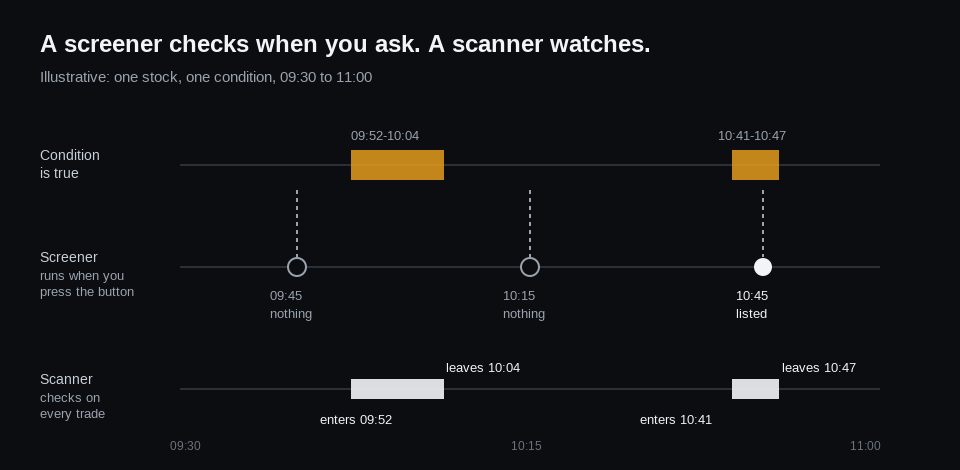
A trader who runs a screener at 09:45, 10:15 and 10:45 sees the stock once, at 10:45, and never learns about the first move. Nothing was wrong with the screener. It answered the question it was asked at the moment it was asked. A scanner answers a different question: not "what matches now?" but "tell me when something starts to match."
Stock screener vs stock scanner side by side
| Stock screener | Stock scanner | |
|---|---|---|
| When it checks | When you run it | Continuously while the market is open |
| Typical data | Fundamentals and daily prices, often delayed | Live trades and intraday bars |
| Typical conditions | P/E, market cap, sector, 50-day average | Price vs VWAP, relative volume, breakouts |
| What you get | A list as of one moment | A list that changes, usually with alerts |
| Best for | Investing, swing trading, research after hours | Day trading and anything that happens in minutes |
The names are used loosely
Product names do not follow this split. Plenty of tools called screeners refresh every minute, and some tools called scanners only run on a timer. To find out what a product really does, check four things:
- How often it evaluates. On every trade, every few seconds, once a minute, or only when you press run. A scan that runs once a minute can miss a stock that matched for thirty seconds. We covered this in why "real-time" stock scanners are often misleading.
- How old the data is. Real-time, or 15 minutes late. See real-time stock scanners vs delayed data.
- Whether it alerts. A list you have to watch is a screener in practice, however often it refreshes.
- Whether it understands time. Can a condition say "in the first hour" or "in the last 10 minutes", or "this happened, then that"? See why time-based conditions matter in a stock scanner.
Which one do you need?
If you invest or swing trade and do your research outside market hours, a screener is the right tool, and the free ones are good. Our comparison of free and paid stock screeners covers when it is worth paying.
If you trade during the day, you need a scanner, because the thing you are looking for usually lasts minutes. A common morning routine uses both: a screener the night before to build a watchlist, and a scanner during the session to watch it. Our guide to building a pre-market trading routine walks through that.
The same condition in Fastur
Fastur is a scanner. You describe a condition in plain English and it becomes a short script that runs against every trade. "Up 5% today on three times its usual volume" becomes:
logicblock MomoVolume = trade.last >= d1.close[1] * 1.05 and d1.volume >= d1.volume[1:20].mean * 3In a screener, that condition is checked when you run it. In Fastur, it is checked every time one of the stocks it covers trades, so a stock is listed on the trade that makes the condition true, and an alert can fire at that moment. The relative volume scan guide and our post on what relative volume is and how scanners calculate it explain the volume half of that line in more detail.
The takeaway
A screener tells you what matches at the moment you ask. A scanner tells you when something starts to match. Neither is better in general. They answer different questions, and the right one depends on whether the thing you trade lasts days or minutes.
